| English / Deutsch | Print version |
HID Invert driver
| HID Invert |
| License |
| Download |
| Axis and button mapping |
| Show current mode |
| Set inversion and button remapping mode |
| Debug mode |
| Compile |
| Install |
| Blacklist DragonRise driver |
| Resources |
HID Invert
This is a Linux kernel driver to invert the input axis and remap buttons of an arcade stick controllers to use the device with the opposite hand. Not every game has a setup to remap the axis and buttons. This driver is a workaround.
The driver has been tested and is configured for the KUBII Arcade USB Controller.
lsusb output of the KUBII Arcade USB Controller:
ID 0079:0006 DragonRise Inc. PC TWIN SHOCK Gamepad
The driver hid_invert is an USB HID driver. The inversion mode can be changed with the 'hidinvert' tool.
This driver can be seen as example driver. Things can be done better, but it is a good start. Maybe :)
Known issues: As I have only one device, at the moment I do not add support to handle different invert modes when more than one KUBII Arcade USB Controller is connected.
License
HID Invert by Elmar Hanlhofer, Copyright (c) 2026.
License: GPL-2.0
Download
Source code: hidinvert-0.1.tar.gz, released 16/April/2026, ~2 MB.
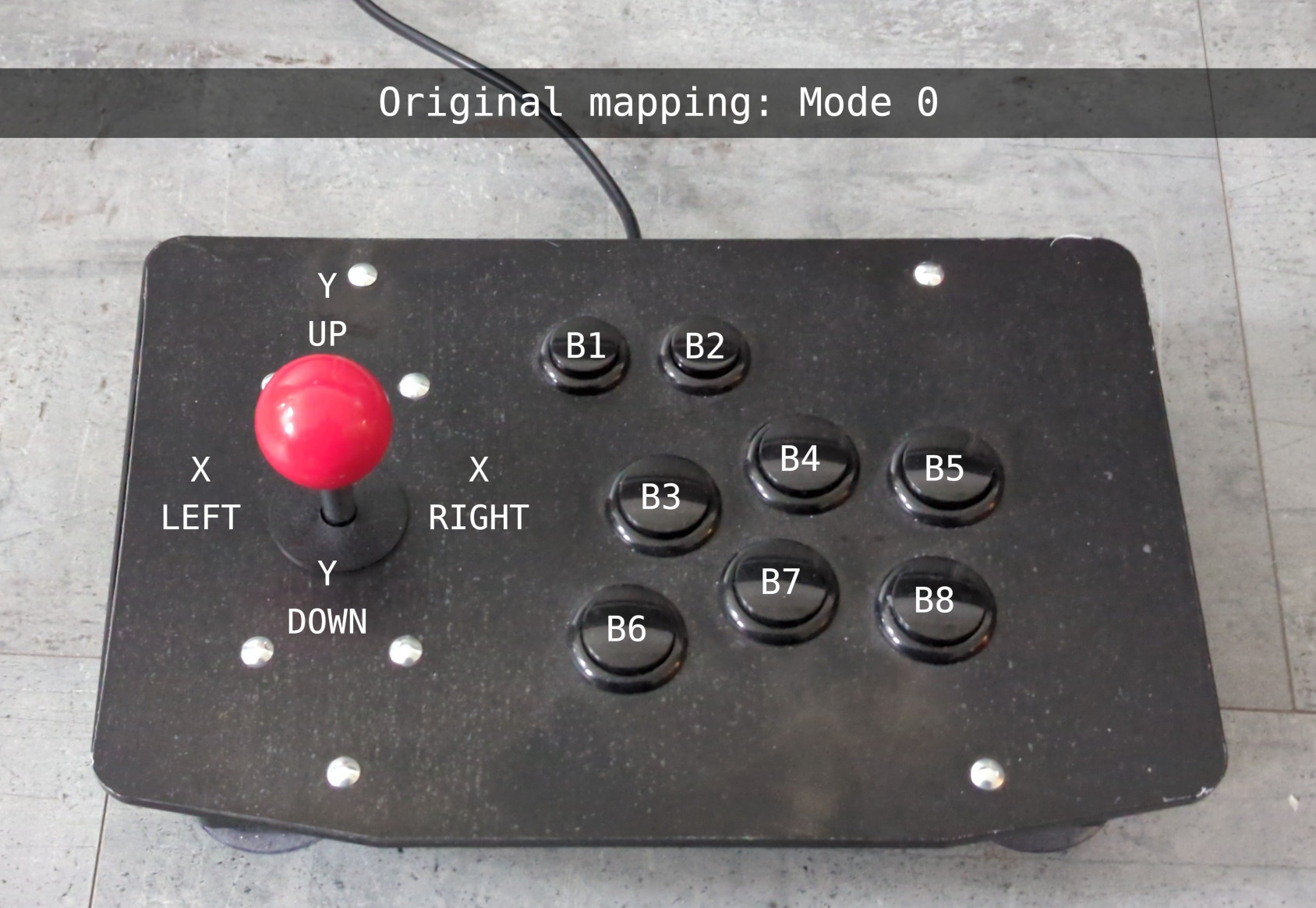
Stick axis and button mapping
   Axis         Buttons      |       HID report byte / bit
-----------------------------+---------------------------------------
    Y0        B1  B2         |    [1]    [6]0x04  [6]0x08
  X0  X1        B3  B4  B5   |  [0] [0]     [5]0x10  [5]0x20  [5]0x40
    Y1        B6  B7  B8     |    [1]    [5]0x80  [6]0x01  [6]0x02
Inversion mode 0/off:
Do not invert axis or remap buttons.
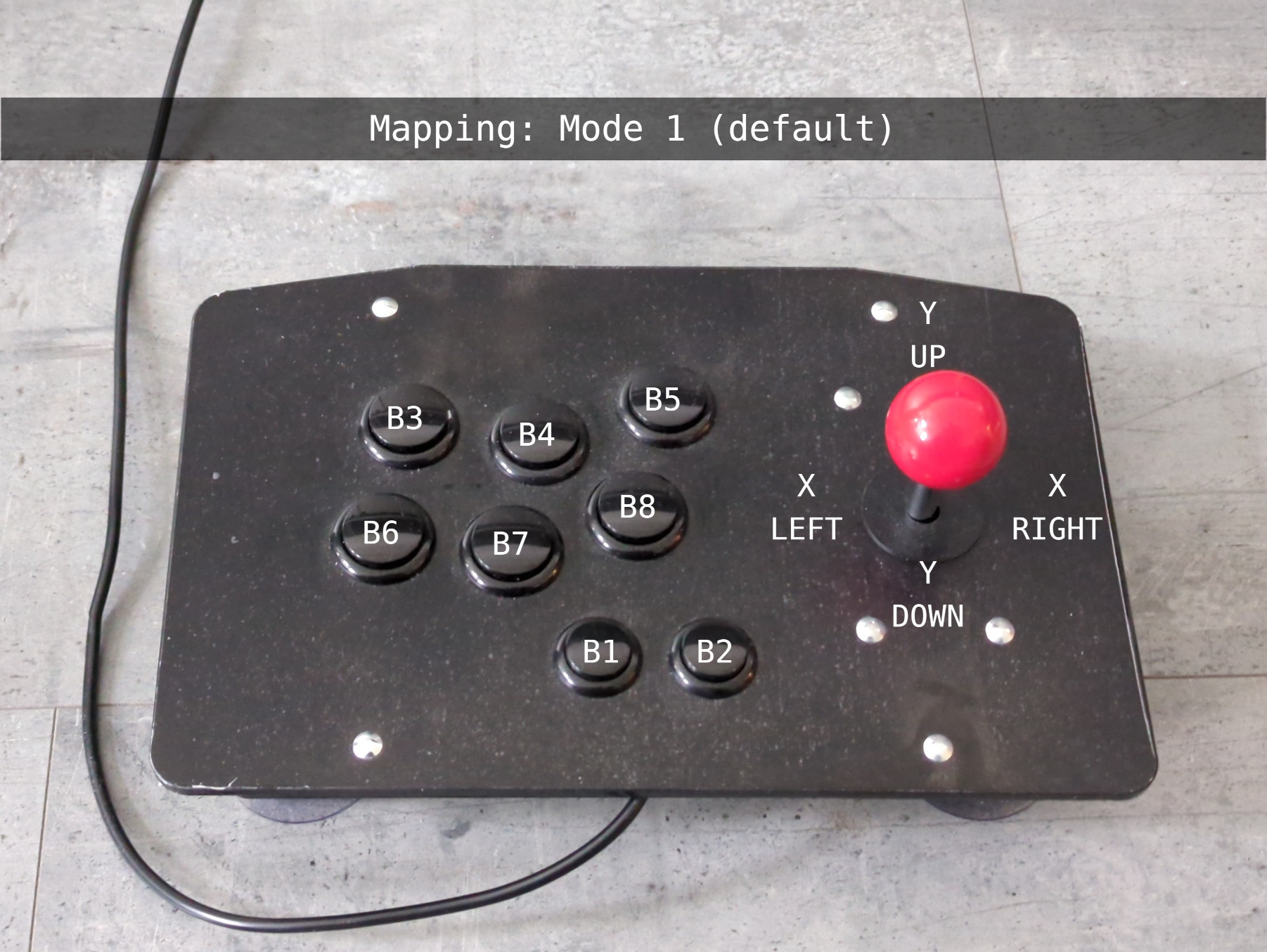
Inversion mode 1 (default):
Invert X axis
Invert Y axis
Remap buttons:B1 -> B2
B2 -> B1
B3 -> B8
B4 -> B7
B5 -> B6
B6 -> B5
B7 -> B4
B8 -> B3
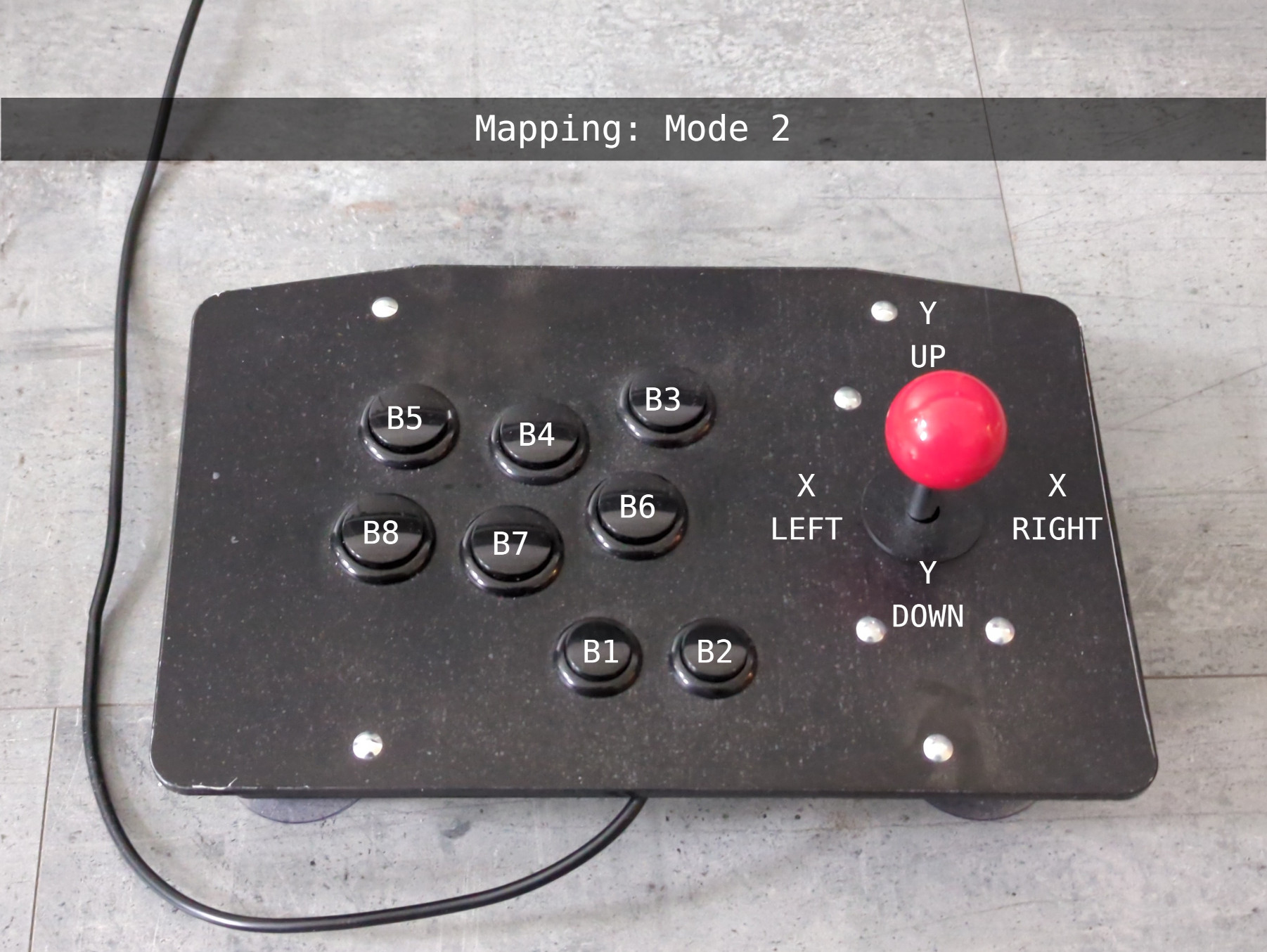
Inversion mode 2:
Invert X axis
Invert Y axis
Remap buttons:B1 -> B2
B2 -> B1
B3 -> B6
B4 -> B7
B5 -> B8
B6 -> B3
B7 -> B4
B8 -> B5
Show current mode
Run 'hidinvert' without parameter.
sudo hidinvert
Set inversion and button remapping mode
sudo hidinvert [value]
Possible values:
0 ... Off, no inversion or button remapping.
1 ... Invert X and Y axis, set button mapping 1.
2 ... Invert X and Y axis, set button mapping 2.
Debug mode
sudo hidinvert [value]
Possible values:
D ... Debug on.
d ... Debug off.
Compile
Run 'make' to compile the driver. The file 'hid-ids.h' will be copied automatically from the Linux kernel source tree.
Install
Run 'make install' to install the kernel driver 'hid_invert' to '/lib/modules/{KERNEL}/updates' and also install the tool 'hidinvert' to '/usr/bin'.
Or 'make modules_install' to install only the kernel driver to '/lib/modules/{KERNEL}/updates'.
Blacklist DragonRise driver
The Linux kernel has already a driver for devices with the Vendor ID 0x0079 (DragonRise) and Product ID 0x006 to enable force feedback support. The driver must be black listed to get the hid_invert driver to work.
See 'blacklist.conf'. Copy the file or the content to '/etc/modprobe.d/blacklist.conf'.
blacklist.conf:
#/etc/modprobe.d/blacklist.conf

# Do not load the DragonRise kernel driver.
blacklist hid_dr
Resources
kobject implementation:
See Linux kernel source code 'samples/kobject/'.
USB HID:
See Linux kernel source code 'drivers/hid/'.
© 2026 by
Elmar Hanlhofer
This page was last modified on 16/Apr/2026.